Networking Setup
Overview
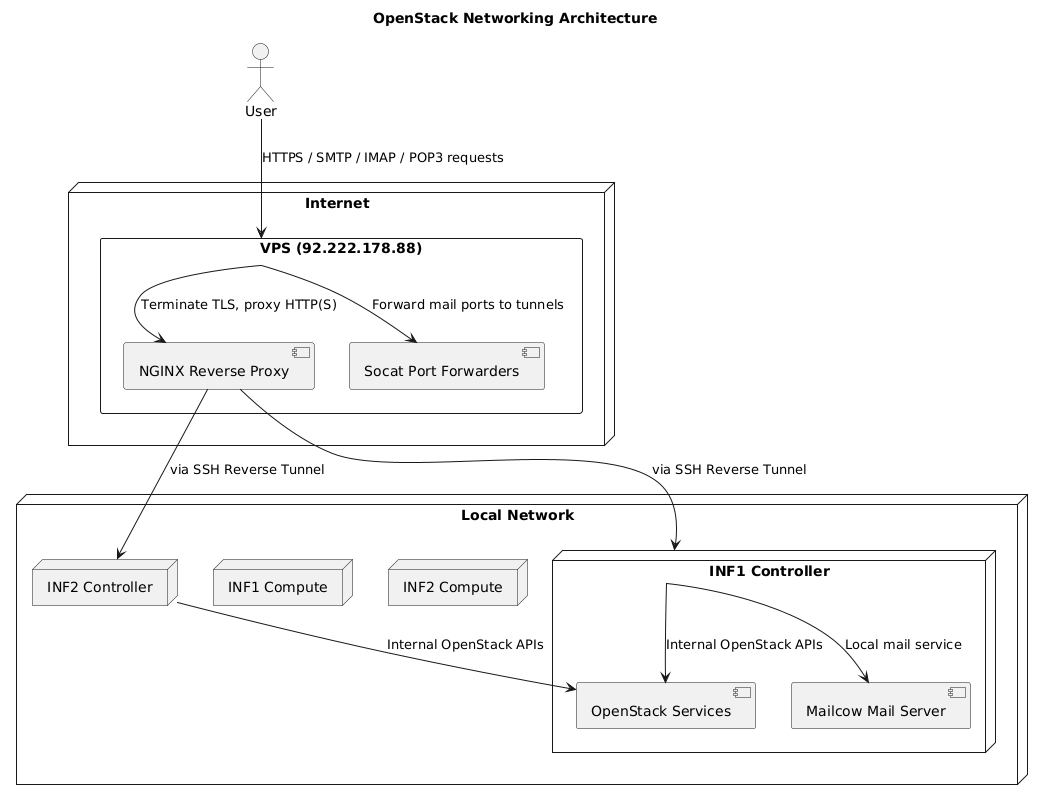
This document details the network architecture used to securely expose the OpenStack infrastructure (INF1 and INF2) and the mail server using SSH reverse tunnels and NGINX reverse proxies. A VPS acts as a public gateway to forward traffic from the internet to internal services running on private networks.
SSH Reverse Tunnel: Mail Server Exposure (INF1 Controller)
The Mailcow mail server runs inside the INF1 controller node on a private network. To expose SMTP, SMTPS, IMAPS, and POP3S services externally, an SSH reverse tunnel is created from the INF1 controller node to the VPS (92.222.178.88):
ssh -fN -o ServerAliveInterval=60 \
  -R 2525:localhost:25 \
  -R 2587:localhost:587 \
  -R 2465:localhost:465 \
  -R 2993:localhost:993 \
  -R 2995:localhost:995 \
  ubuntu@92.222.178.88
Ports correspond to standard mail services:
- SMTP: 25, 587 (submission)
- SMTPS: 465
- IMAPS: 993
- POP3S: 995
The ServerAliveInterval=60 option helps keep the tunnel alive.
The -fN options run SSH in the background without opening a shell.
Port Forwarding on VPS for Mail Server
To map public-facing mail ports on the VPS to the tunneled ports, socat listeners are set up:
sudo socat TCP-LISTEN:587,fork,reuseaddr TCP:localhost:2587 &     # SMTP (submission)
sudo socat TCP-LISTEN:465,fork,reuseaddr TCP:localhost:2465 &     # SMTPS
sudo socat TCP-LISTEN:993,fork,reuseaddr TCP:localhost:2993 &     # IMAPS
sudo socat TCP-LISTEN:995,fork,reuseaddr TCP:localhost:2995 &     # POP3S
These allow external clients to connect securely to the mail services hosted inside the private network.
SSH Reverse Tunnel: OpenStack Services Exposure
To expose OpenStack services running on INF1 and INF2 securely through the VPS, reverse SSH tunnels are established from the VPS back to the internal hosts:
ssh -fN \
  -R 56080:172.20.20.241:6080 \  # Horizon
  -R 58774:localhost:8774 \      # Nova API
  -R 58778:localhost:8778 \      # Nova API
  -R 59292:localhost:9292 \      # Glance
  -R 5500:localhost:5000 \       # Keystone
  -R 59696:localhost:9696 \      # Neutron
  -R 58776:localhost:8776 \      # Nova API
  -R 58443:localhost:443 \       # HTTPS Proxy
  -R 58000:localhost:8000 \      # Magnum API
  -R 58004:localhost:8004 \      # Heat API
  ubuntu@92.222.178.88
Updated mapping for OpenStack services:
| Tunnel Port | Service | Internal Port |
|---|---|---|
| 5500 | Keystone | 5000 |
| 58774 | Nova API | 8774 |
| 58776 | Nova API | 8776 |
| 58778 | Nova API | 8778 |
| 59292 | Glance API | 9292 |
| 56080 | Horizon (VNC) | 6080 |
| 59696 | Neutron API | 9696 |
| 58443 | HTTPS Proxy | 443 |
| 58000 | Magnum API | 8000 |
| 58004 | Heat API | 8004 |
NGINX Reverse Proxy Configuration on VPS
NGINX acts as the TLS termination point and reverse proxy for incoming requests, forwarding them to tunneled ports.
Mail Server Proxy (mail.ulmexa.com)
server {
    listen 80;
    server_name mail.ulmexa.com;

    root /var/www/html;
    index index.html;

    location /.well-known/acme-challenge/ {
        allow all;
    }

    location / {
        return 404;
    }
}

server {
    listen 443 ssl;
    server_name mail.ulmexa.com;

    ssl_certificate /etc/letsencrypt/live/mail.ulmexa.com/fullchain.pem;
    ssl_certificate_key /etc/letsencrypt/live/mail.ulmexa.com/privkey.pem;

    location / {
        proxy_pass http://<k8s-mailu-ip>:80;  # Kubernetes Mailu service IP
        proxy_set_header Host $host;
        proxy_set_header X-Real-IP $remote_addr;
        proxy_set_header X-Forwarded-For $proxy_add_x_forwarded_for;
        proxy_set_header X-Forwarded-Proto $scheme;
    }
}
OpenStack Proxy (openstack.ulmexa.com)
Example for Keystone service:
server {
    listen 5000 ssl;
    server_name openstack.ulmexa.com;

    ssl_certificate /etc/letsencrypt/live/openstack.ulmexa.com/fullchain.pem;
    ssl_certificate_key /etc/letsencrypt/live/openstack.ulmexa.com/privkey.pem;

    ssl_protocols TLSv1.2 TLSv1.3;
    ssl_ciphers HIGH:!aNULL:!MD5;

    location / {
        proxy_pass https://localhost:5500/;  # Tunnel endpoint
        proxy_set_header Host $host;
        proxy_set_header X-Real-IP $remote_addr;
        proxy_set_header X-Forwarded-For $proxy_add_x_forwarded_for;
        proxy_set_header X-Forwarded-Proto $scheme;
    }
}
Other OpenStack APIs (Nova, Glance, Neutron, Horizon, Magnum, Heat) are exposed on their respective ports with similar proxy blocks.
Summary Table of Ports and Services
| Service | Internal Host/Port | VPS Tunnel Port | Public Access URL |
|---|---|---|---|
| Mailcow SMTP | INF1 Controller: 25, 587 | 2525, 2587 | mail.ulmexa.com:587 |
| Mailcow SMTPS | INF1 Controller: 465 | 2465 | mail.ulmexa.com:465 |
| Mailcow IMAPS | INF1 Controller: 993 | 2993 | mail.ulmexa.com:993 |
| Mailcow POP3S | INF1 Controller: 995 | 2995 | mail.ulmexa.com:995 |
| Keystone | INF1/INF2: 5000 | 5500 | openstack.ulmexa.com:5000 |
| Nova API | INF1/INF2: 8774, 8776, 8778 | 58774, 58776, 58778 | openstack.ulmexa.com:8774, 8776, 8778 |
| Glance API | INF1/INF2: 9292 | 59292 | openstack.ulmexa.com:9292 |
| Horizon (VNC) | INF1/INF2: 6080 | 56080 | openstack.ulmexa.com:6080 |
| Neutron API | INF1/INF2: 9696 | 59696 | openstack.ulmexa.com:9696 |
| Magnum API | INF1/INF2: 8000 | 58000 | openstack.ulmexa.com:8000 |
| Heat API | INF1/INF2: 8004 | 58004 | openstack.ulmexa.com:8004 |
Network Flow Visual